> For the complete documentation index, see [llms.txt](https://docs.storware.eu/llms.txt). Markdown versions of documentation pages are available by appending `.md` to page URLs; this page is available as [Markdown](https://docs.storware.eu/overview/architecture.md).
# Architecture
## Components
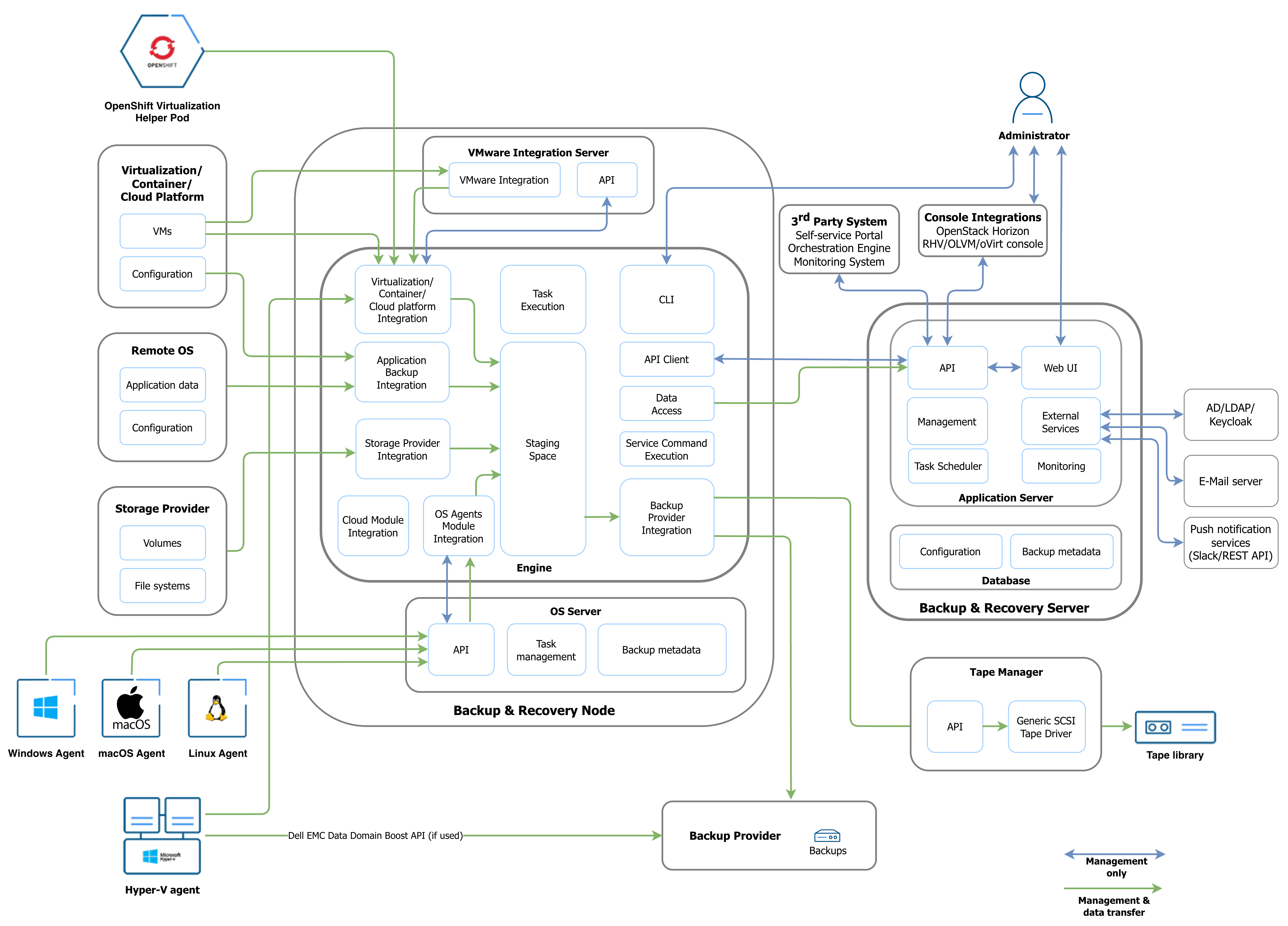
Storware Backup and Recovery uses the following components.
### Server
The Server is the central control component. It coordinates system operations and stores system metadata. It also provides configuration management, monitoring, and coordination between components.
{% hint style="info" %}
**Deployment considerations**
* You can install the Server on a physical or virtual machine.
* You can install the Server and Node on the same host.
* For high-availability deployments, see [High Availability](/deployment/high-availability.md).
{% endhint %}
### Node
The Node transfers and processes backup data. It runs backup, restore, and mount tasks.
{% hint style="info" %}
**Deployment considerations**
* You can install the Server and Node on the same host.
* Nodes require network connectivity to the Server and backup destinations.
* Depending on the configuration, Nodes also require connectivity to the Hyper-V Agent, OpenShift Helper Pod, or Tape Manager.
* Nodes can run on physical or virtual systems. Disk-attachment export mode may require a Node virtual machine, also called a Proxy VM, on a hypervisor cluster.
{% endhint %}
### OS Server
The OS Server manages metadata for file-level backup and restore operations. It is installed as part of the Node.
### OS Agent
The OS Agent is installed on the protected system. It performs file system backup and restore operations on macOS, Windows, and Linux.
### Hyper-V Agent
The Hyper-V Agent is installed on each Hyper-V host, not in the virtual machines. It provides data access and transfers data to the Node or Dell Data Domain through the DD Boost API.
### OpenShift Helper Pod
The OpenShift Helper Pod is deployed for each backup task. It mounts persistent volumes and transfers data to the Node. Storware Backup and Recovery deploys the pod from the central repository. You can override the image and pod parameters in the Node properties file.
### Tape Manager
The Tape Manager manages tape libraries and transfers data to and from the Node.
## Workflows
### Inventory synchronization
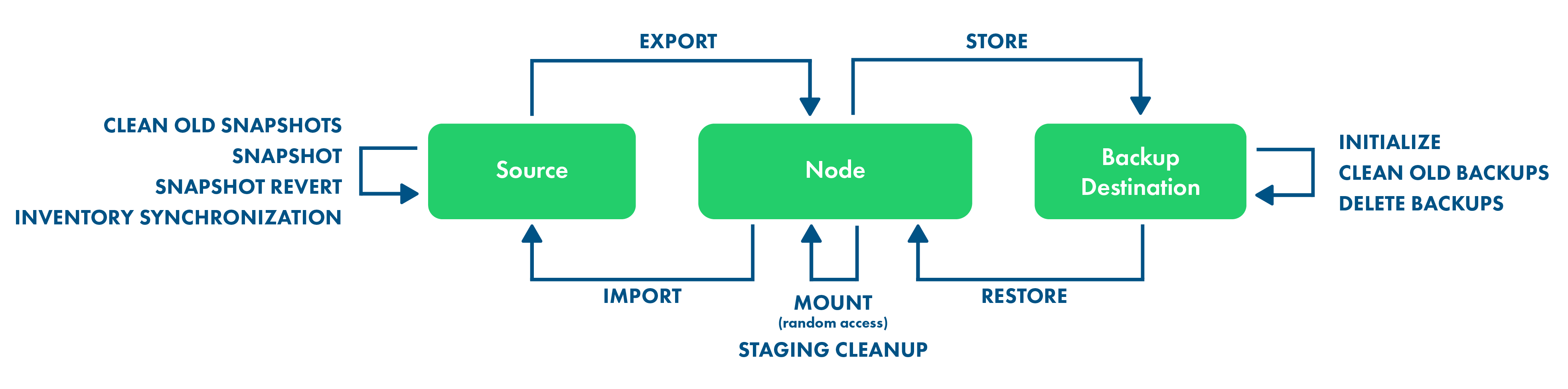
Synchronize a source before configuring its protection. This task collects configuration data and the protected-entity inventory, then stores it in the database. It runs periodically and can also run on demand to refresh the source configuration or inventory.
### Backup
* **Export** - creates a backup or snapshot and exports data to staging space.
* **Store** - moves data to the backup destination.
* **Staging Cleanup** - removes temporary staging artifacts when required.
* **Clean Old Snapshots** - removes unneeded source-platform snapshots.
* **Clean Old Backups** - removes backup files according to the protected entity's retention settings.
### Restore to the Node
* **Restore** - retrieves data from the backup provider and places it in staging space.
### Restore to a virtualization platform
* **Restore** - retrieves data from the backup provider and places it in staging space. For full backups on a file system backup provider, the task identifies the files for import.
* **Import** - imports the data to the virtualization platform and recreates the virtual machine.
### File-level restore, iSCSI sharing, and instant recovery
* **Restore** - retrieves data from the backup provider and places it in staging space. For full backups on a file system backup provider, the task identifies the files for mounting.
* **Mount** - mounts the backup on the Node. It enables file browsing, exposes the backup through iSCSI, or exposes data to a hypervisor for instant recovery.
### Snapshot
* Creates a local, persistent virtual-machine snapshot in the hypervisor environment. The assigned policy controls snapshot retention.
### Snapshot revert
* **Snapshot Revert** - reverts a selected hypervisor snapshot. Select the snapshot in the web console.
### Delete backups
* **Delete** - removes a protected entity, such as a virtual machine, from the inventory. Backups for that entity must also be removed from the backup destination.
### Initialize a backup destination
* **Initialize** - writes metadata to a file system backup destination. The Node uses this metadata to confirm that a mount point belongs to the configured destination. Run this workflow once for each backup destination.
Each Storware Backup and Recovery workflow consists of one or more tasks.