> For the complete documentation index, see [llms.txt](https://docs.storware.eu/llms.txt). Markdown versions of documentation pages are available by appending `.md` to page URLs; this page is available as [Markdown](https://docs.storware.eu/overview/main-features.md).
# Main Features
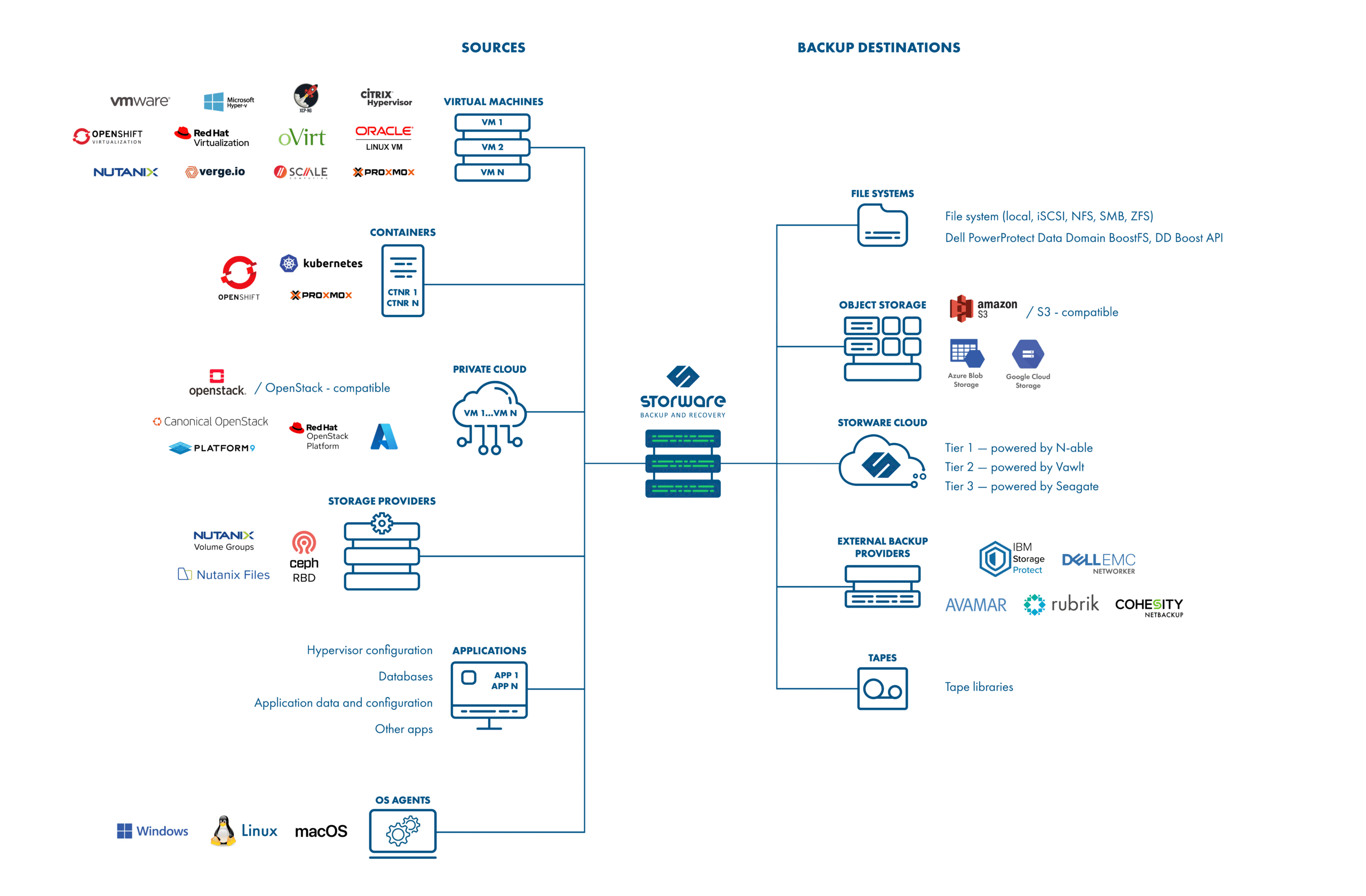
Storware Backup and Recovery is a data protection solution for virtual environments, storage, and endpoints. It provides a centralized and automated solution for data protection. It can be deployed in minutes and start to protect your environment within hours.
## Supported backup platforms
### Virtual Machines
* Azure Stack HCI
* Citrix Hypervisor (XenServer)
* Microsoft Hyper-V
* Nutanix (AHV)
* OpenStack (Vanilla, Red Hat, Canonical, and OpenStack-compatible)
* OpenShift Virtualization
* Oracle Linux Virtualization Manager
* oVirt
* Proxmox VE
* Red Hat Openshift Virtualization
* Red Hat Virtualization
* SC//Platform
* Virtuozzo
* VergeOS
* VMware vSphere
* XCP-ng
### Containers
* Kubernetes
* Proxmox VE
* Red Hat OpenShift
### Storage
* Ceph RBD
* Nutanix Files (with Changed-File Tracking)
* Nutanix Volume Groups (with Changed-Region Tracking)
### Applications
* Generic, customizable mechanism to plug in any script-based application backup into the central console
* Allows the use of native backup mechanisms of apps such as databases, hypervisor configurations, Git, and more
### Agent for file-level backup
* Windows (including VSS)
* Linux
* macOS
## Advanced backup features
* Snapshot Management
* Snapshot consistent technology
* Pre/post remote command execution on VM
* Change Block Tracking (CBT) and Change file tracking (CFT) for faster incremental backups
* VM disks exclusion option
* Hyper-V direct transfer to the DataDomain (DD Boost API)
* VM automatic policy assignment based on regular expressions and tags
* Backup job prioritization
* Multi-node architecture
* Automatic task load balancing
* Suitable for geographically distributed environments
## Recovery features
* File-level restore using mountable backups
* Option to share RAW VM disks in backup over iSCSI
* Recovery plans for automated Disaster Recovery
* Schedulable execution for automatic recovery testing
* Customizable networking and disk layout during a restore
* Instant restore
* Hyper-V
* oVirt/RHV/OLVM
* VMware
* OpenStack
* Disk/network/security group selection
## Supported backup destinations
* Filesystem-based:
* A synthetic backup provider for XFS/NFS 4.2/ZFS or Dell Data Domain
* Rubrik Managed Volumes
* isoLayer (Air-Gapped Protection)
* Catalogic vStor
* Any mounted file system
* Object Storage:
* Amazon S3 / S3-compliant storage
* Impossible Cloud
* Google Cloud Storage
* Microsoft Azure Blob Storage
* Enterprise-grade backup providers:
* IBM Spectrum Protect (TSM)
* Rubrik
* Dell EMC Networker
* Dell EMC Avamar
* Cohesity Netbackup
* Tapes
* Deduplication with supported providers, including ZFS, DataDomain, and others
* Backup Copy - secondary backup destination to store data in more than one location
## Security features
* Role-based access control (RBAC) for administrative accounts
* Audit log for administrative actions
* Customizable logging configuration for external SIEM support
* Data-at-rest encryption for file system backup destination
* Immutable Backup that protects backup data from being encrypted by ransomware
* Air-Gap Data Protection with:
* Rubrik Managed Volumes
* Catalogic vStor
* isoLayer
## Other features
* Web-based central management portal
* Advanced reporting
* Event notifications using e-mail, Slack, or custom API call
* Command Line Interface
* Open API for 3rd party software integration (REST API)
* LDAP authentication
* Keycloak authetication
* OpenStack Horizon plugin (with option to integrate into Skyline)
* oVirt/RHV/OLVM console integration